On this page
Field Notes
Improving Tool Pages for Users—and for SEO
How behaviour data helps improve user experience, meaningful engagement, and the value of search traffic—with a practical font-tool example.
Make the visit useful
We spend time getting people to a tool page. But what happens after they arrive?
Can they find the input, get a result, and use it? Or does a small problem—a confusing limit, an awkward button, missing feedback—get in the way?
That is where behaviour data becomes useful. It helps us decide what to improve based on how people use the page. The goal is simple: make the visit more useful, then measure engagement and search performance.
A calculator, converter, or text tool can follow the same approach. Here is how I would use it, with a small font-tool review as an example.
What did the visitor come to do?
A search query often tells us the job someone wants to do. The page needs to make that job easy to start and finish.
If the tool is buried below several paragraphs, visitors have to work before they can begin. If the title promises something the tool cannot deliver, clearer instructions alone will not solve the mismatch. If someone reaches a result but cannot understand or use it, the experience is still incomplete.
Supporting content should help with those moments. A short example beside an unfamiliar input can be more useful than a long introduction. An explanation next to a result can help someone act on it. A visible file-size limit can prevent an avoidable failed upload.
These are small decisions, but together they determine whether the page delivers on the reason someone clicked.
Are people getting somewhere?
More time on a page is not always a better outcome. Someone who gets an answer in twenty seconds may have had an excellent visit. Someone who spends three minutes repeatedly clicking a button may be stuck.
For a tool, I care about whether people start, get a result, and successfully use it. That could mean completing a calculation, obtaining a converted file, or copying some text.
Clicks and time spent can help explain that journey, but they need context. A repeated action might show interest, or it might show missing feedback. Even a click on Copy only records an attempt until we know whether the clipboard write worked.
The aim is to make useful actions easier and more reliable. A quicker, simpler visit can be a sign that we have improved engagement in the way that matters.
Where does the experience get in the way?
Session recordings and interaction data help us see where the intended experience differs from the actual one. Do visitors notice the input? Do mobile users struggle with a control? Does the page explain what happened after an action?
I would start with one recurring problem, watch what happens around it, and try the task myself. The recording points us towards a question; testing helps establish the cause.

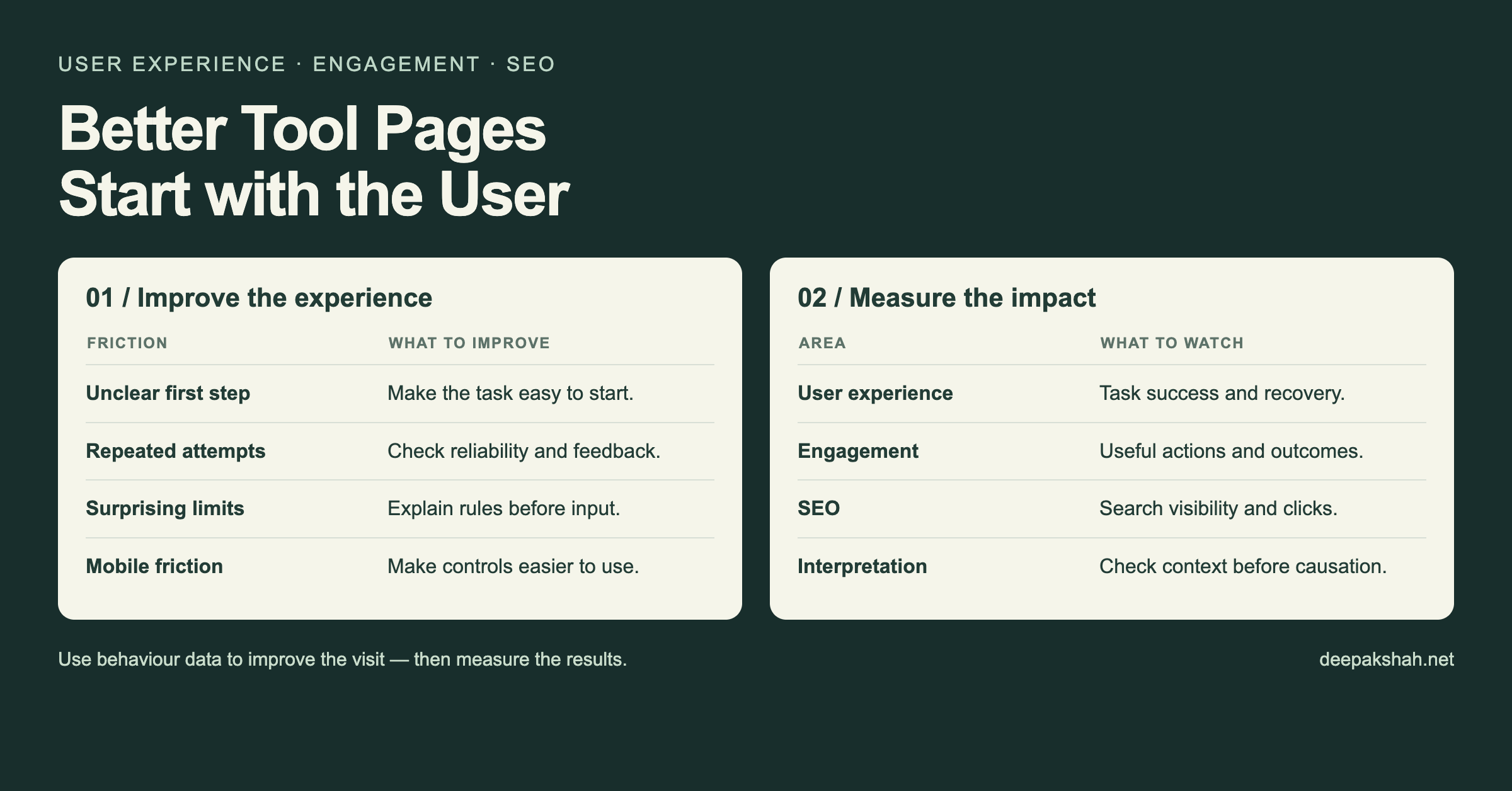
| What needs attention | What to investigate or improve |
|---|---|
| Visitors struggle to begin | Make the starting point clearer and remove unnecessary steps. |
| People repeat an action | Check responsiveness and show clear progress or feedback. |
| Mobile controls are awkward | Improve tap areas, spacing, labels, and keyboard behaviour. |
| Input limits cause surprises | Explain the rules before they interrupt the task. |
These changes have a practical purpose: help someone get through the task with less effort. After making a change, check whether that part of the experience actually works better.
A small example from a font tool
In a September 2026 review of a font tool, 65 of 80 recorded sessions were on mobile. That made the mobile experience a sensible place to look first.
Browser testing found small copy controls, a character limit that silently shortened pasted text, and no visible explanation when clipboard denial was simulated. Normal copying worked in the test.
The proposed improvements were straightforward: make copying easier to tap, explain the input limit, and give people a recovery option when copying fails. Those changes address the task visitors came to complete.
The recordings covered a particular observation window, and the tests identified specific problems. We did not measure an engagement or ranking uplift. The example shows how behaviour data can lead to a useful improvement list, with a clear reason behind each change.
Where SEO fits
This is how I would connect the work to SEO: understand the intent behind the visit, make the page deliver on it, and improve the experience of using it.
That approach is consistent with Google's guidance on creating helpful content for people. For a tool page, my interpretation is that usefulness includes both the explanation and the functioning tool. Google's helpful-content guidance
Performance matters too. Google says Core Web Vitals are used in ranking, although good scores do not guarantee high rankings. Better usability or higher engagement in our analytics does not automatically establish a ranking gain. Google's page-experience guidance
I would therefore measure two things alongside each other: whether visitors can complete the task more successfully, and how the page performs in search. Search Console can show changes in impressions and clicks; product data helps us understand what happens after arrival. Changes in both still need context before we attribute them to the same cause.
If more people get a useful result while search traffic stays flat, the work has still made that traffic more valuable. That is the connection I want to keep: bring people to a relevant tool, help them finish the job, and use their experience to decide what to improve next.