On this page
Engineering
PDF Parser Benchmark: Three Tools, Three Annual Reports
A single-run comparison of LiteParse, pdf-inspector, and anydoc on three Antelopus Selan Energy annual reports, with table checks and a silent coverage failure.
The question behind the comparison
Could a fast local PDF parser give me financial data I can check, without quietly dropping most of a report? I tried three tools on annual reports from Antelopus Selan Energy: LiteParse, pdf-inspector, and anydoc.
The most useful result was about coverage and table structure, not speed. LiteParse returned text for all three reports and preserved the operating cash-flow row in my spot check. pdf-inspector returned only 45,449 characters for FY2025, with 132 of 158 pages empty. anydoc stopped on that report with a `NeedsOcr` error.
The timings are one run per parser and report. They are useful as a record of this experiment, not a reliable speed ranking.
Results at a glance
Here are the results recorded during the run. Character counts describe how much text came back; they do not measure whether the numbers or table structure were correct.
| Report | Parser | Elapsed | Characters returned | Observed result |
|---|---|---|---|---|
| FY2024 (165 pages) | LiteParse | 1.39 s | 434,069 | Text returned |
| FY2024 (165 pages) | pdf-inspector | 2.20 s | 441,888 | Text returned |
| FY2024 (165 pages) | anydoc | 1.28 s | 431,882 | Text returned |
| FY2025 (158 pages) | LiteParse | 1.70 s | 446,852 | Text returned |
| FY2025 (158 pages) | pdf-inspector | 2.03 s | 45,449 | 132 pages empty; classifier reported TextBased and zero pages needing OCR |
| FY2025 (158 pages) | anydoc | — | — | NeedsOcr error; no output |
| FY2026 (178 pages) | LiteParse | 1.98 s | 493,579 | Text returned |
| FY2026 (178 pages) | pdf-inspector | 1.94 s | 496,201 | Text returned |
| FY2026 (178 pages) | anydoc | 1.15 s | 493,364 | Text returned |
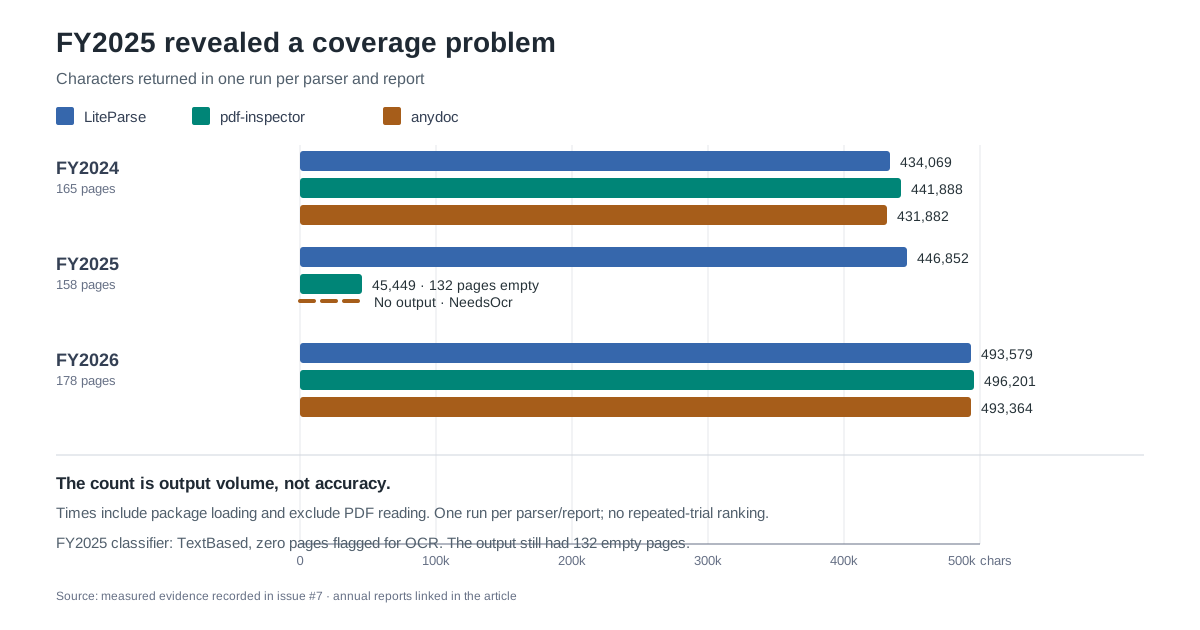
The elapsed times include loading the parser package and exclude reading the PDF from disk. Treat every number as a single observation, not a median or a stable ordering of the tools.
For FY2026, the run note recorded observed maximum resident set sizes of about 262 MiB for LiteParse, 279 MiB for pdf-inspector, and 250 MiB for anydoc. These are single-run observations; the measurement procedure was not retained.
Which reports did I test?
I used the FY2024, FY2025, and FY2026 annual reports linked from the company page on Screener. These source PDFs remain available from BSE:
| Report | BSE source | Pages | File size |
|---|---|---|---|
| FY2024 | Annual report PDF | 165 | 24,323,938 bytes |
| FY2025 | Annual report PDF | 158 | 19,481,535 bytes |
| FY2026 | Annual report PDF | 178 | 23,061,511 bytes |
Each parser ran once per report in a node:22-bookworm Docker container limited to two CPUs, 3 GiB of memory, and 256 processes. The container used --network none; there was no GPU. The installed versions were @llamaindex/liteparse 2.15.1, @firecrawl/pdf-inspector 1.25.2, and @firecrawl/anydoc 0.2.4.
This tests those package versions, settings, reports, and one container setup. It does not tell me how they compare on other PDFs, machines, or configurations.
A useful parsing path needs checks after extraction
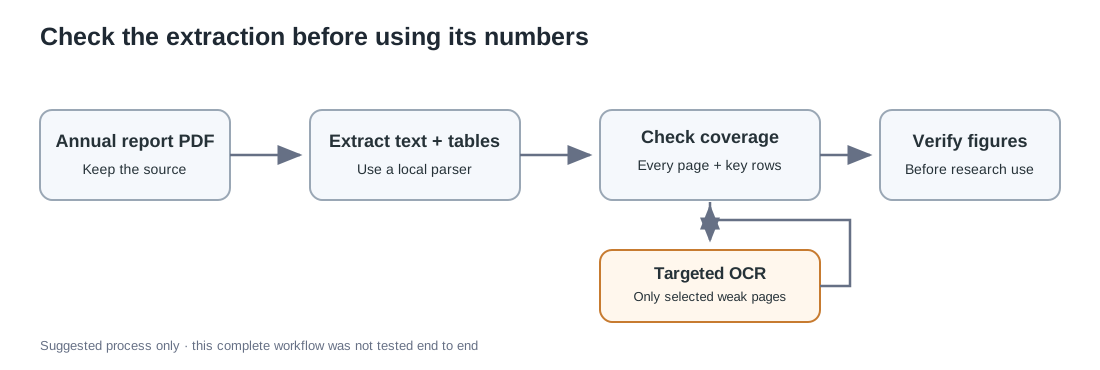
A parser returning text is only the first step. For financial research, I would also check page coverage, inspect important rows, and route specific pages to OCR when their text is missing or unreliable.
The diagram is a proposed workflow, not a measured end-to-end system from this experiment.
A cash-flow row showed why character counts are not enough
I checked the row labeled “Net cash from Operating activities (A)” in the statements of cash flows. In the FY2025 BSE report, PDF page 95 prints ₹12,574.64 lakhs for the year ended 31 March 2025 and ₹7,167.25 lakhs for the comparative year.
LiteParse kept the row label and its values together in the spot checks across all three reports. pdf-inspector merged or misplaced adjacent table content in FY2024 and FY2026, and the row was absent from its FY2025 output. anydoc collapsed labels and values in FY2024 and FY2026, then returned an OCR error for FY2025.
That is a narrow spot check, not a full audit of the reports’ financial data. A large text output can still have a broken table, and a parser can return text while leaving large parts of a document empty.
FY2025 exposed a silent coverage failure
The FY2025 pdf-inspector run returned 45,449 characters, and 132 of the report’s 158 pages were empty in the extracted output. Its classifier reported TextBased and zero pages needing OCR. That result did not warn me that most pages were empty.
The project documentation describes classification as sampling PDF content. A sampled, document-level label is a useful routing hint, but it cannot stand in for checking every page when the document may mix page types. Empty extracted pages do not, by themselves, prove that every page is scanned.
The separate anydoc run failed with NeedsOcr and produced no output. Its documentation says the local PDF path does not perform OCR; an optional hosted fallback sends the document to a service. That path was not part of this network-isolated test.
Targeted OCR recovered the seven pages I selected
I ran a separate LiteParse OCR pass on seven selected FY2025 pages that needed OCR. It took 2.82 seconds and returned 4,960 characters, with all seven pages nonempty. The pass used local CPU Tesseract with the English tessdata_fast data; it did not use a GPU or network access during OCR.
This is a different unit of work from parsing a complete report. I keep its time separate from the whole-document timings, and seven nonempty pages do not establish that every recognized number is correct.
The LiteParse Node documentation describes OCR configuration and targeted pages. The pdf-inspector project and its Node API documentation describe classification, extraction, and selective OCR. The anydoc documentation describes its local PDF path and NeedsOcr behavior. anydoc routes PDF parsing through pdf-inspector, so these are not three fully independent PDF extraction engines.
What this run cannot establish
There was one run per report and parser. I did not calculate p50 or p95 latency, repeat the experiment, or perform a full numeric accuracy audit. The reported character counts measure output size, not correctness. I also did not test anydoc’s hosted OCR path.
The temporary benchmark directory, downloaded PDFs, parser installs, and raw outputs were deleted after the experiment. The BSE source PDFs are still linked above, but I do not have retained parser outputs, exact command lines, PDF hashes, or a documented character-count method. This post records the evidence that remains; it is not a reproducibility package, and I should rerun the test before making a stronger claim.
The measurements describe a CPU-only Docker test. They are not a CubeSandbox benchmark, and they do not show that any parser ran in CubeSandbox. A future isolation test would be a separate experiment.
What I would use for the next check
For these three reports, I would start with LiteParse because it returned text for each report and kept the operating cash-flow row together in my spot checks. I would still verify every figure used in research against the source PDF, and add page-level completeness checks before processing a larger batch.
The practical lesson is simple: test whether a parser kept the pages and table relationships you need. A fast parse and a large character count cannot answer that on their own.