On this page
Engineering
CubeSandbox vs Docker: Startup Speed, Memory, and What We Learned
What same-host tests showed about CubeSandbox and Docker: startup time, shared memory costs, and command completion at 100 and 500 microVMs.
The question behind the benchmark
I wanted to know whether CubeSandbox would help us start new workspaces faster. We already had Docker, so the useful comparison was both setups on the same machine, running the same tools.
The startup numbers looked good. With ten workspaces starting together, median readiness was 1,170 ms for Docker and 88 ms for Cube. But once a workspace was already running, Docker finished our two small checks slightly faster.
That led to the questions I actually cared about: what were we measuring, how much memory did Cube need, and would it still be useful with hundreds of workspaces?
Results at a glance
| What we measured | Result |
|---|---|
| New workspace readiness, 1–10 concurrent workers | Prepared Cube restores were 5.5–13.3× faster than fresh Docker creation |
| Creation through completion of both CLI checks | Cube was 1.9–4.5× faster in the small matched tests |
| Reusing an already-running workspace | Docker had slightly lower median completion times |
| Shared Cube platform, without guests | Approximately 1.38–1.68 GiB of working-set memory |
| 100-VM burst | All guests started and passed both checks |
| 500-VM burst | All guests started; 445 passed both checks and 55 timed out |
The startup comparison uses a cached Docker image and an already prepared Cube snapshot. Image downloads and snapshot preparation are excluded. Those conditions belong with the result whenever it is quoted.
Hardware and test limits
We ran the benchmarks on September 8, 2026, in India Standard Time. The CPU model and topology were read from the same host the next day.
| Component | Configuration |
|---|---|
| CPU | Two Intel Xeon Gold 6138 processors, 2.00 GHz base clock |
| Cores and threads | 40 physical cores, 80 logical CPUs; two NUMA nodes |
| Host memory | Approximately 123 GiB usable RAM |
| OS | Ubuntu 26.04, Linux 7.0.0-28-generic |
| Software | Docker 29.4.3, CubeSandbox v0.7.0 |
| Cube worker limit for the 1/5/10-worker comparison | 16 CPU equivalents, 24 GiB RAM |
| Cube worker limit for the 100/500-VM tests | 32 CPU equivalents, 32 GiB RAM; swap disabled |
| Each workload container or guest | 1 CPU, 512 MiB RAM limit |
| Cube data filesystem | Sparse 32 GiB XFS loop filesystem |
The host had more resources than we assigned to the test worker. A 32-CPU quota means a limit on CPU time; it does not mean the server had only 32 physical cores. The underlying storage hardware was not recorded, so we cannot describe it as an SSD or NVMe setup.
Why VMs if we already have Docker?
I was interested in giving separate workloads their own environments. Docker containers and Cube microVMs can both serve that purpose, but the isolation boundary differs.
Ordinary Linux containers share the host kernel. A VM has a guest kernel of its own. Cube uses KVM and a RustVMM-based monitor to run its microVMs. That makes it worth evaluating for separate users' code, while still checking credentials, files, networking, privileges, and cleanup. A latency benchmark does not establish the security of the whole system. Docker's explanation and Cube's architecture at the tested revision explain the boundaries.
In our experiment, Docker hosted Cube's services and worker. The worker used the physical host's KVM support to create guest VMs. There was no additional worker VM in the original benchmark.
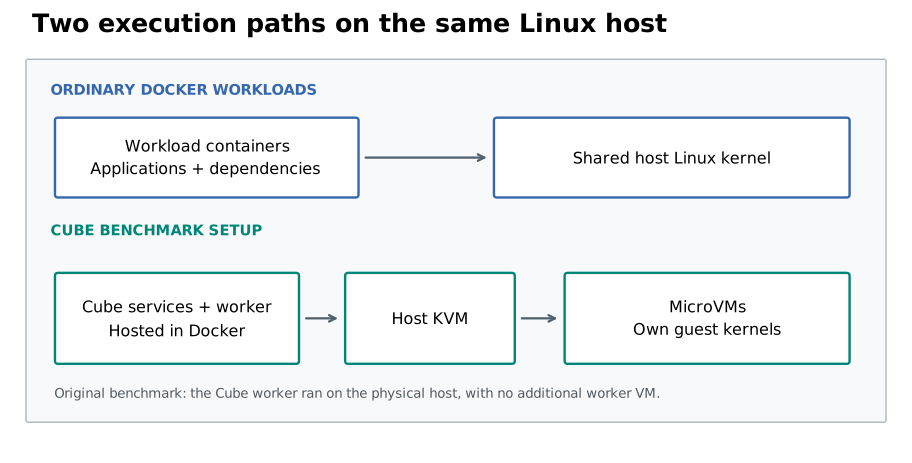
What did we put on the stopwatch?
Both setups used the same exported workload image, Python, and CLI packages. We measured two intervals:
- Workspace readiness: create or restore the workspace and reach its readiness check.
- Time through both checks: start at that same point, then finish SearchVector
--helpfollowed by AppVector--help.
The second interval includes readiness. Both exclude teardown, image downloads, snapshot preparation, and full application initialization. The runtime API and networking paths were included, and those paths differed between Docker and Cube.
Across creation, reuse, and Cube resume modes, we recorded 300 measured trials and 600 matching CLI outputs, all passing. There were 20 trials per runtime/mode/concurrency group; 80 warmup trials were excluded. We used a shared host, ran modes in batches, and did not flush the host page cache. Treat these as exploratory measurements of this setup.
How much faster was startup?
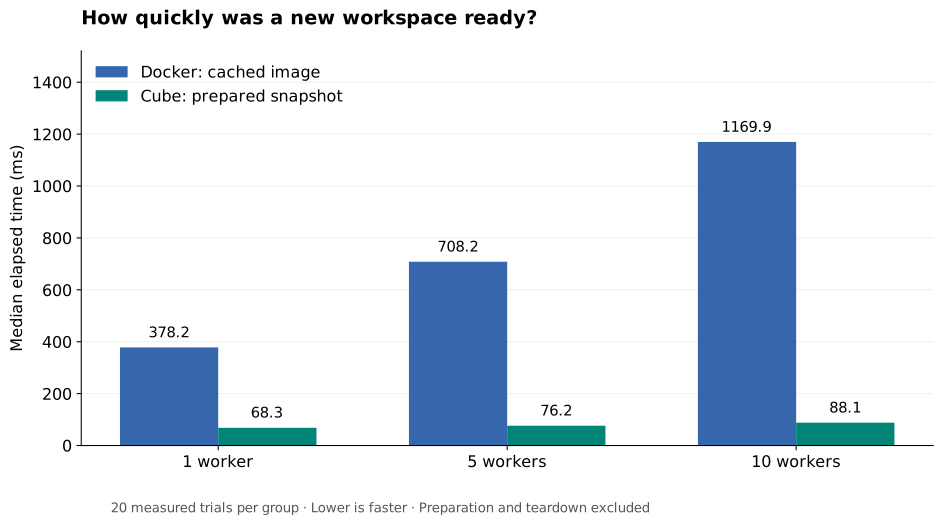
| Concurrent workers | Docker ready | Cube ready | Readiness speedup |
|---|---|---|---|
| 1 | 378.2 ms | 68.3 ms | 5.5× |
| 5 | 708.2 ms | 76.2 ms | 9.3× |
| 10 | 1,169.9 ms | 88.1 ms | 13.3× |
Cube stayed below 100 ms median readiness across these runs. But I also wanted to see what happened when we included the commands.
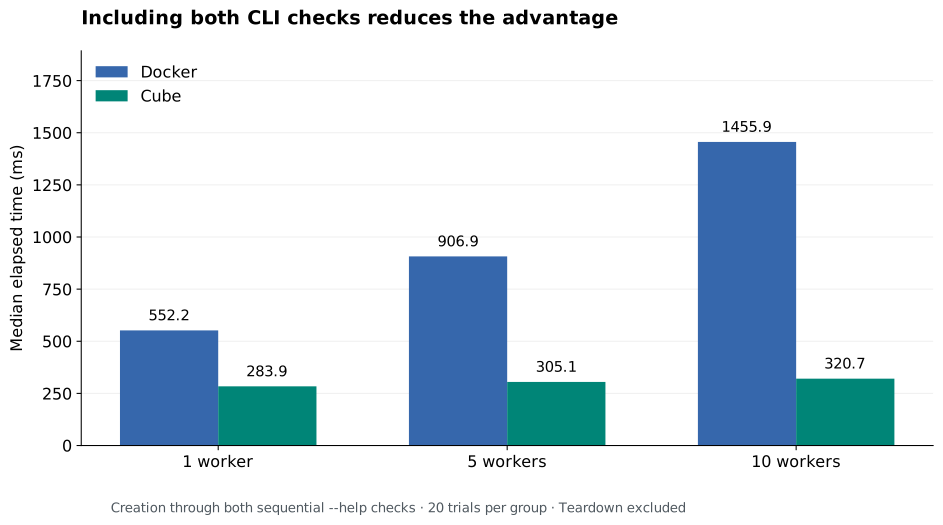
| Concurrent workers | Docker through both checks | Cube through both checks |
|---|---|---|
| 1 | 552.2 ms | 283.9 ms |
| 5 | 906.9 ms | 305.1 ms |
| 10 | 1,455.9 ms | 320.7 ms |
That brings the measured advantage down to 1.9–4.5×. It is a useful distinction when deciding whether faster startup will matter to an actual tool invocation.
The medians also hide some longer waits. At ten fresh Cube workers, readiness p95 was 95.2 ms, but completion p95 was 1,310.1 ms. Docker's corresponding figures were 1,271.1 and 1,564.7 ms. These are nearest-rank p95 values from only 20 samples per row.
What if we keep the workspace running?
Docker had lower median times when we reused an existing workspace and ran the same checks after a health round trip.
| Concurrent workers | Reused Docker | Reused Cube |
|---|---|---|
| 1 | 167.3 ms | 177.5 ms |
| 5 | 183.2 ms | 187.5 ms |
| 10 | 196.3 ms | 239.4 ms |
So the application pattern matters. Cube's strongest result here was preparing a fresh environment. A service that keeps a Docker container running starts from a different position.
We also tested Cube pause/resume. Pausing itself took 294, 519, and 1,050 ms median at 1, 5, and 10 workers. Resuming to readiness took about 68, 71, and 99 ms, excluding that earlier pause. A repeated pause/resume workflow needs to account for both phases.
Was the memory cost for every VM?
This was one of my first questions when I saw the memory figure. The 1,416–1,719 MiB was for the shared Cube platform with no guests—roughly 1.38–1.68 GiB. It included the worker, supporting services, and benchmark registry.
Adding ten idle Cube guests increased the worker's working set by about 111.7 MiB in one comparison. Ten idle Docker workload containers had approximately 120.5 MiB of summed working set. Those figures have different boundaries, and Docker's daemon baseline was not measured. They do not establish that Cube uses less total memory.
The configured 512 MiB guest limit is also different from memory actually used or reserved. Active commands consumed much more than idle guests.
What happened with hundreds of VMs?
We ran one synchronized burst at 100 Cube VMs and one at 500. All guests were verified resident together, held idle for five seconds, and then given the CLI checks concurrently. Within each guest, the checks still ran sequentially.
For these tests, we raised the worker cap to 32 CPU equivalents and 32 GiB RAM, expanded the guest pool and admission limits, and deliberately overcommitted guest resources. Docker was not retested at these counts.
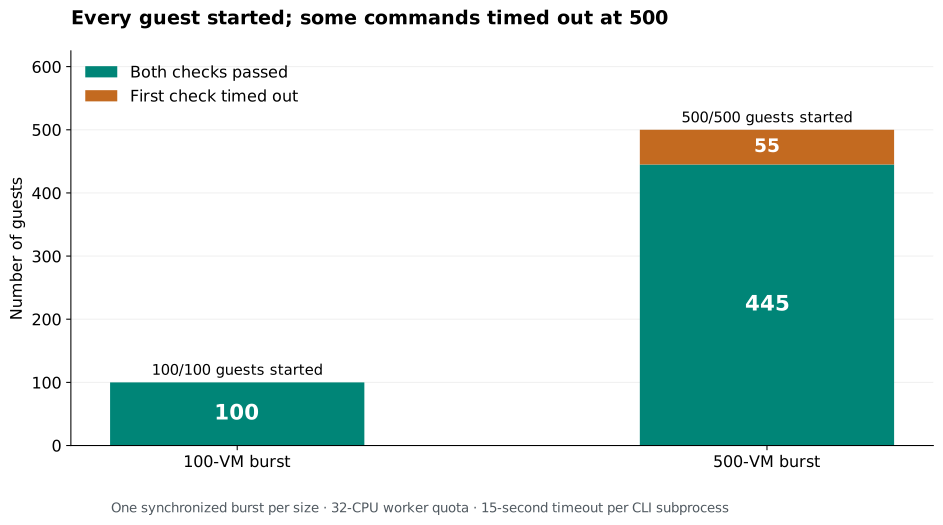
| Measurement | 100 VMs | 500 VMs |
|---|---|---|
| Ready and resident together | 100/100 | 500/500 |
| Median readiness from burst start | 0.367 s | 2.854 s |
| Last guest ready | 0.431 s | 4.177 s |
| Both checks passed | 100/100 | 445/500 |
| Command-timeout responses | 0 | 55 |
| Guests remaining after cleanup | 0 | 0 |
At 500 VMs, the worker saturated its 32-CPU quota and 55 guests failed the first check; they did not run the second. The fixture returned a combined invalid-request/timeout message. With the fixed requests and recorded error paths, those failures were classified as timeouts. Each CLI subprocess had a 15-second timeout.
CPU contention accompanied those failures, but one run does not isolate every cause. There were no memory-guard events or outer-worker OOM kills. We did not increase the timeout or repeat the run until it passed.
Memory at 100 and 500 VMs
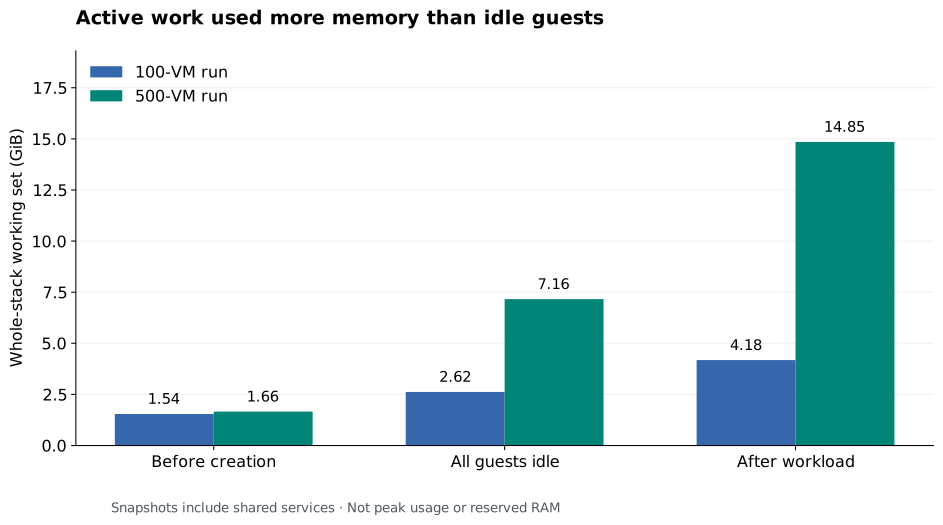
| Whole Cube stack | 100 VMs | 500 VMs |
|---|---|---|
| Before guest creation | 1.54 GiB | 1.66 GiB |
| All guests held idle | 2.62 GiB | 7.16 GiB |
| After the workload | 4.18 GiB | 14.85 GiB |
Here, working set is cgroup usage minus inactive file memory. Shared pages and retained caches affect it. The worker-only sampled peaks were 3.63 and 14.19 GiB, measured about once a second; those cover a different boundary from the whole-stack snapshots above.
What needed more work?
An early pilot could create and reuse workspaces but failed to resume them because a required proxy component was missing. Adding it recovered resume behavior.
Recreating the outer Cube worker later invalidated an existing template. Rebuilding the template recovered operation, but the root cause remained unresolved in this benchmark record. Passing the timing sweep did not prove restart durability. The storage setup also needed XFS reflink support, which is why we used the loop filesystem.
Our driver created and deleted guests explicitly. We did not test an autoscaler, sustained demand, or whether hundreds of full agent sessions would complete successfully.
Where I would use this result
I would use these measurements to decide which real workload to test next. For frequently created isolated workspaces, prepared Cube restores look useful. For workspaces that stay running, Docker remained competitive and was slightly faster on our small checks.
Before making a broader change, I would want repeated completion results, recovery tests, and checks on user data boundaries, quotas, and cleanup. The next useful measurement is how much of a real tool invocation is spent preparing its workspace. That tells us whether the startup gain matters to the person waiting for the result.