On this page
AI & Models
Building My Own AI Chat Harness
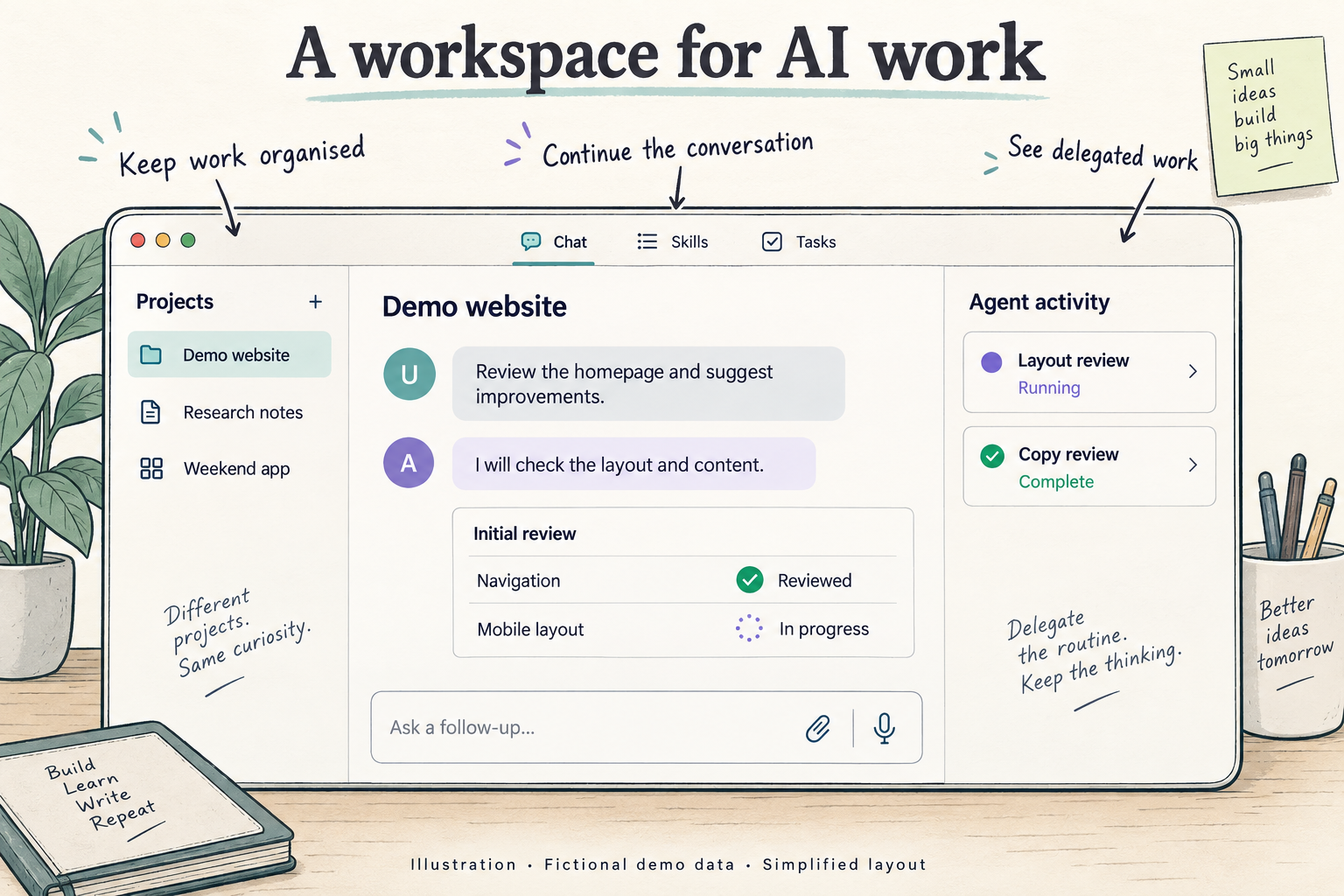
Inside my personal AI workspace: pinned conversations, visible subagents, reusable skills, and ways to continue work across chat, voice, and companion clients.
The workspace at a glance
I built my own AI chat workspace around Codex. It lets me keep several conversations visible, follow delegated agents, reuse skills, and return to earlier work. The project also includes a browser side panel, messaging integrations, and an Android client.
The useful question for me is how these pieces fit into everyday work. Can I see what is running? Can I return to the right conversation? Can I give an agent a repeatable procedure without explaining it again?
Here is what the workspace has today, how I use its controls, and what I am still improving.
What can it do?
The browser workspace is the main interface. Companion clients cover different parts of the workflow; they do not all have the same features.
| Capability | What it lets me do |
|---|---|
| Channels and threads | Organise conversations around different pieces of work |
| Session search and resume | Find earlier work and continue an existing session |
| Pinned conversations and stars | Keep selected chats visible and mark others to return to |
| Forks and follow-up queues | Explore another direction from a message and save follow-ups while a run is active |
| Tracked subagents | See delegated work, its status, and its conversation |
| Tasks | Create, organise, run, and archive work |
| Skills | Find reusable instructions for recurring workflows |
| Optional memory | Bring relevant preferences and context into a conversation |
| Rich inputs and answers | Work with attachments, PDF text, images, code, tables, and diagrams |
| Voice and companion clients | Use additional ways to send requests and receive answers |
Why build my own workspace?
I want control over how I organise and review AI work.
For a single question, a conversation is straightforward. With several tasks, I also need to know which session is active, where a delegated task went, and which earlier conversation contains the context I need.
Those are the decisions I can shape in my own workspace. I can choose what stays visible, how an agent's progress is presented, and how I return to unfinished work.
The underlying execution uses an existing Codex agent service. The harness provides the surrounding workspace and connects it to that service.
Keeping several conversations in view
The workspace has channels and threads for organisation. Pinned Focus lets me keep selected conversations visible in panes. Stars mark conversations I want to return to without opening them in an active pane.
Here is a simplified example with dummy content:
PINNED FOCUS                      Demo workspace

+----------------------+----------------------+
| Homepage review      | Article outline      |
| Running              | Ready to review      |
|                      |                      |
| Checking navigation  | Draft outline ready  |
| and mobile layout... | for your feedback.   |
|                      |                      |
| [Follow-up] [Stop]    | [Reply]              |
+----------------------+----------------------+

STARRED
* Research notes             [Open]
* Weekend app                [Open]
Concept wireframe using fictional conversations and statuses. It illustrates pinned panes and starred sessions, rather than exact button placement or a measured run.
I can also resume an existing session, import an earlier Codex conversation, or fork from a particular message when I want to explore another direction. Follow-up prompts can be saved in a queue while a run is active.
Resuming is useful, but it does not mean an unlimited conversation fits into the model's active context. That is a separate constraint.
Seeing delegated work
When I give another agent part of a task, I want to know where that work went.
The workspace keeps tracked subagents connected to their parent conversation. I can inspect their status and transcripts, and archive them when appropriate. There is also a task layer for work that needs to be created, organised, executed, and tracked explicitly.
For a fictional website review, one agent might review the layout while another checks the copy. The point of the interface is to make those assignments and their progress visible.
Visibility does not prevent conflicting code edits. When several agents work on a repository, I still need clear ownership, separate worktrees where appropriate, and an order for integrating changes.
How a request moves through it
The harness connects the conversation interface to the agent runtime. The runtime carries out the request and uses tools when needed, while the workspace presents progress and the result.
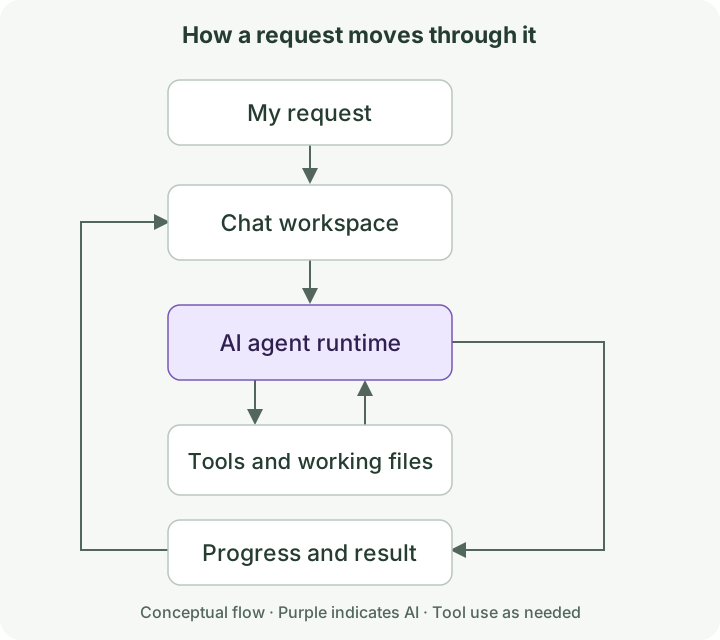
The project has a web workspace with messaging and mobile clients. Keeping the interfaces separate from execution lets me improve how I interact with the agent while using the underlying agent service.
Skills and memory
I use skills for repeatable procedures. A blog-publishing skill, for example, can explain the content format and the checks needed before an article goes live.
The workspace includes skill discovery so those procedures are easier to find. Which skills are available depends on the environment serving the workspace.
Optional memory integration can bring relevant preferences and context into a conversation. Skills and memory serve different purposes: one describes a procedure; the other supplies context that may help with the current task.
Memory still needs to be available and accurate. I do not want the agent to claim it remembers something when the service is unavailable or the retrieved information is wrong.
Making the output useful
A comparison is easier to review as a table. A workflow can be easier to understand as a diagram. Code needs to remain readable and easy to copy.
The workspace supports Markdown tables and lists, code blocks, Mermaid diagrams, and images. It also accepts attachments and extracts text from PDFs.
Streaming adds another requirement: the interface receives incomplete text as the answer arrives. It needs to handle those partial responses as well as the finished result.
These details affect whether I can review an answer comfortably in the conversation itself.
Using other interfaces
The Chrome side panel puts the web workspace beside the page I am viewing. Google Chat and Slack bridges connect messaging threads to agent sessions and include integrations with my task-management tools.
The Android client provides text and voice input, session selection, streamed replies, and speech playback.
These interfaces have different capabilities. I would not describe them as interchangeable versions of the full browser workspace.
Voice is also still developing. A detailed written answer can be useful on screen and too long to listen to. The experimental web voice flow supports a shorter spoken response alongside the visual conversation, and the Android client includes continuous voice and interruption controls.
Responsiveness and reliable interruption still need attention before I would call this a finished hands-free experience.
What this does not establish
Private channels control access to conversations. Execution isolation is a separate concern: it depends on the runtime and the environment in which tools and code run.
My CubeSandbox benchmarking is a separate experiment. It should not be taken as evidence that every session in this workspace already runs inside its own microVM.
The features described here are present in the implementation, but the interfaces are at different stages of maturity. A feature inventory is not a benchmark of reliability or productivity.
What I want to improve next
I want to give the agent work, see what it is doing, bring in the right skill, and return later without having to reconstruct the whole conversation.
The next thing I care about is how comfortably those pieces work together when several tasks are active: which conversations need attention, whether delegated work is easy to inspect, and how quickly I can pick up where I left off.
That is what I want to keep refining as I use the workspace.